Automation: where to start in a Swiss SME
Automation is not about adding tools. It is about removing unnecessary repetition from a process you already understand.
Automation can help a small or medium-sized business reduce repetitive tasks, improve the follow-up of enquiries and make its processes more reliable. The outcome, however, depends largely on the process you choose.
Applied to a clear way of working, automation can save time. Applied to a poorly defined process, it mostly accelerates errors, moves confusion into a new tool or creates an additional technical dependency.
So the first question should not be:
Which automation tool should we use?
A more useful question would be:
Which process is currently slowing our business down, and which specific part deserves to be improved?
This guide sets out a practical method for selecting a first automation, preparing the process, running a limited test and measuring the results.
Automation is one component of a structured digital environment. To understand how websites, tools, information and processes work together, read our guide to digital architecture for Swiss SMEs.
What does automating a process mean?
Automating a process means handing certain repetitive actions, which follow sufficiently clear rules, over to a system.
An automation can, for example:
- send a confirmation once a form has been received;
- record an enquiry in a tracking system;
- assign a task to the right person;
- create a reminder;
- transfer information between two tools;
- generate a document from validated data;
- flag a situation that requires human intervention.
The aim is not to remove human involvement. In many cases the system prepares, organises or forwards information, and a person remains responsible for checking or deciding.
A useful automation therefore has to state two things: what the system carries out, and what remains a human responsibility.
Automation and artificial intelligence: what is the difference?
Automation and artificial intelligence can appear in the same workflow, but they do not perform the same function.
Traditional automation applies a defined rule:
When a form is submitted, record the enquiry and send a confirmation.
Artificial intelligence comes in when a step requires a form of analysis or interpretation:
When an enquiry is received, analyse its content, prepare a summary and propose a category.
A workflow can combine both:
- A prospect fills in a form.
- The system records the enquiry automatically.
- An AI solution prepares a summary of it.
- A rule assigns the enquiry to the relevant person.
- A person checks the summary and decides what happens next.
- The system sends the approved communication.
AI is particularly useful when the result can be checked. It should be used more cautiously when an error could affect a client, a financial decision, a contractual obligation or sensitive information.
Why start with the process rather than the tool?
Many automations begin with the discovery of an application. The business sees a demonstration, chooses a platform, then looks for a problem to apply it to.
That approach reverses the logical order of the project.
A tool should only be chosen once you have defined:
- the process concerned;
- the friction point observed;
- the people involved;
- the information required;
- the expected outcome;
- the situations that must remain under human control.
Without this preparation, the business risks adding another subscription, creating duplicates or building a workflow nobody knows how to maintain.
The right starting point is a precise, observable problem. The tool comes afterwards.
How do you recognise a process worth automating?
A process deserves examination when several of these situations occur regularly:
- the same information is entered more than once;
- data is copied manually between different tools;
- enquiries go unanswered;
- follow-ups depend on one person's memory;
- the same errors appear frequently;
- clients have to repeat information they have already provided;
- similar documents are recreated by hand;
- the volume of work becomes difficult to absorb;
- the team lacks visibility over the status of enquiries.
These signs do not automatically mean automation is needed. They indicate that a process deserves to be observed, simplified and assessed.
How do you choose the first process to automate?
A business can start by identifying 3 processes that consume time or generate errors.
Then give each process a score from 1 to 5.
| Criterion | Question to examine |
|---|---|
| Frequency | How often does this process repeat? |
| Time | How much time does it take each week or each month? |
| Consistency | Do the steps generally follow the same rules? |
| Error risk | Do errors or omissions occur regularly? |
| Impact | Does the process affect clients, revenue or service quality? |
| Complexity | How many exceptions have to be handled? |
| Sensitivity | Does the process use confidential or regulated data? |
A frequent, repetitive and important process with few exceptions is generally a good first candidate.
A rare or sensitive process, or one that depends on many human decisions, should be given lower priority, even if automating it seems technically possible.
Example comparison
| Process | Frequency | Time consumed | Consistency | Risk | Priority |
|---|---|---|---|---|---|
| Confirming an enquiry | 5 | 4 | 5 | 2 | High |
| Preparing a complex quotation | 3 | 5 | 2 | 5 | Medium |
| Deciding on a sensitive complaint | 2 | 3 | 1 | 5 | Low |
This assessment does not replace a detailed analysis. It simply helps you avoid starting with the most complex process.
Start with a single important journey
A business does not need to automate its entire activity at once.
It is usually more useful to select one important journey and follow it from beginning to end. That journey might be:
- a contact enquiry;
- an appointment booking;
- a quotation request;
- the arrival of a new client;
- an order;
- the preparation of an invoice;
- the approval of a document;
- the follow-up of a service call;
- the handling of an internal request.
The aim is to represent how the work actually happens, not only the intended procedure.
For each step, note:
- The action carried out.
- The tool used.
- The information required.
- The person responsible.
- The approximate time.
- The possible errors or delays.
- The next step.
This mapping shows precisely where the process slows down and which intervention could produce the most value.
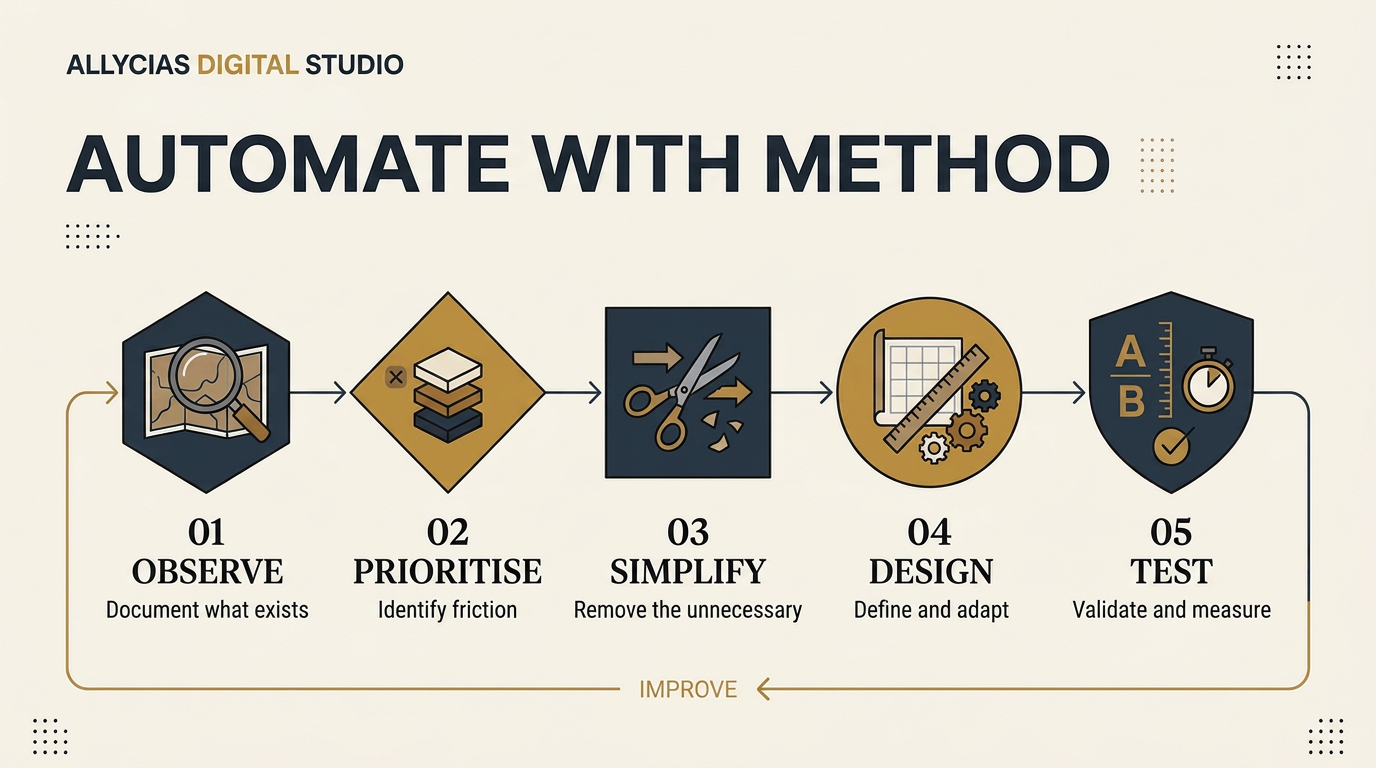
The 6 steps of a well-structured automation
1. Document how things work today
Before changing the process, you need to understand how it currently works.
Note:
- the starting point;
- the individual steps;
- the tools used;
- the information required;
- the people involved;
- the decisions taken;
- the manual actions;
- the final result.
This description must reflect daily reality, even where it differs from the theoretical procedure.
2. Identify the priority friction point
Not all imperfections carry the same weight.
The priority point may be the one that:
- consumes the most time;
- causes the most errors;
- delays responses to clients;
- limits visibility over enquiries;
- creates a dependency on one person;
- prevents the business from handling more volume.
Setting this priority keeps the project precise and measurable.
3. Simplify before automating
A process sometimes contains steps that are no longer necessary.
Before building an automation, ask:
- Does this information really need to be entered twice?
- Is this approval still useful?
- Can the form collect the right information earlier?
- Do two tools serve the same function?
- Can a responsibility be clarified?
- Can a step be removed?
Removing an unnecessary action is often more effective than automating it.
4. Define the expected outcome
The objective must be concrete. For example:
- all enquiries are recorded in the same place;
- every enquiry receives a confirmation;
- the responsible person is clearly identified;
- no follow-up depends on memory alone;
- information only needs to be entered once;
- the team can see the status of every case;
- sensitive situations are passed to a person.
A defined objective then lets you check whether the system genuinely improves how the business operates.
5. Choose a suitable solution
The best solution is not necessarily the most sophisticated.
Depending on the context, the improvement may consist of:
- adjusting an existing form;
- configuring the CRM properly;
- connecting two tools;
- centralising enquiries;
- adding a notification;
- creating an assignment rule;
- using a document template;
- adding an AI function to one specific step;
- removing a tool that is no longer needed.
The choice should take into account the volume of work, the size of the team, the budget, the skills available and confidentiality requirements.
Is conventional automation enough?
Use rule-based automation when:
- the steps are predictable;
- the conditions can be defined clearly;
- the expected result stays constant;
- no complex interpretation is required.
Consider artificial intelligence when the process involves, in particular:
- summarising a text;
- classifying an enquiry;
- extracting information;
- preparing a first draft;
- identifying a pattern or a priority.
AI should not be given sole responsibility for a decision that is sensitive or difficult to correct.
6. Test under real conditions
An automation should not be considered finished as soon as it works once.
You need to test:
- missing information;
- duplicates;
- data-entry errors;
- unusual enquiries;
- connection interruptions;
- changes of responsible person;
- situations that require approval;
- how the system behaves when a tool becomes unavailable.
Test the automation for 30 days
The first version should stay limited. It is better to automate one specific part of the process properly than to build a long workflow that is hard to verify.
Before the test
Record the current situation:
- average handling time;
- number of manual actions;
- number of errors or omissions;
- response time;
- volume handled;
- people involved.
During the test
For 30 days:
- check the results regularly;
- document the errors;
- observe the unusual cases;
- collect feedback from users;
- keep a manual fallback method;
- adjust the rules where necessary.
After the test
Compare the results with the initial situation.
Ask:
- Does the process take less time?
- Have errors decreased?
- Is follow-up clearer?
- Does the team understand how it works?
- Has the client experience improved?
- Is the system reliable enough to keep?
If the results remain hard to observe, the automation may not yet be ready to be extended.
Example: structuring an incoming enquiry
Imagine a service business that receives enquiries through its website.
Before automation
- The prospect fills in a form.
- The enquiry arrives in a general mailbox.
- Someone forwards the message to a colleague.
- The contact details are copied into a spreadsheet.
- The form does not contain all the necessary information.
- An additional message has to be sent.
- A follow-up is added manually to a calendar.
- Tracking then depends on the manager's memory.
Several tools are in use, but the journey is not genuinely connected.
First improvement
The business starts by improving the form so that it collects the useful information at first contact.
It then centralises enquiries in a tracking system and defines a clear responsibility.
Limited automation
The new journey works as follows:
- The prospect submits the form.
- The enquiry is recorded automatically.
- A confirmation is sent.
- The responsible person receives a notification.
- A follow-up task is created.
- A person reviews the enquiry.
- The status stays visible until it is concluded.
AI could optionally prepare a summary or suggest a category. A person would still check the enquiry and decide on the response.
This limited automation reduces double entry and improves visibility without transforming the whole operation straight away.
Privacy and data protection in Switzerland
An automation may move contact details, messages, documents or other information between several services.
Before implementing it, the business should identify:
- the data genuinely required;
- the people authorised to access it;
- the tools in which it will be stored;
- the countries in which the data may be processed;
- the retention period;
- the measures taken in the event of an error or unauthorised access;
- how the individuals concerned are informed.
Contracts, privacy settings and the terms of use of each provider should also be checked.
Sensitive information should not be sent automatically to an AI tool without a prior analysis of the risks, the contractual framework and the applicable obligations.
The most effective solution is not always the one that transfers the most data. A well-designed architecture limits circulation to the information that is genuinely required.
This section provides general design principles. It does not replace legal advice tailored to your activity and your data.
Who maintains the automation?
An automation keeps evolving after it goes live.
A form may be changed. A tool may alter how it works. An authorisation may expire. A new category of enquiry may appear.
The business therefore needs to specify:
- who monitors operation;
- who receives the alerts;
- who may change the rules;
- how changes are documented;
- which procedure applies in the event of an interruption;
- how enquiries are handled manually during an outage;
- how often the system should be checked.
Every significant automation should have an identified owner and a fallback procedure the team can understand.
A system nobody knows how to check or correct gradually becomes a new source of risk.
How do you measure whether the automation works?
An automation should not be judged simply because it works technically.
It must produce an observable improvement.
Before implementing it, choose between 2 and 4 relevant indicators:
- average handling time;
- time to first response;
- number of manual entries;
- number of errors;
- enquiries without follow-up;
- volume handled;
- time spent on corrections;
- team satisfaction;
- quality of the client experience.
For example, a business might set the following objective:
Reduce the average time to first response from 24 hours to 4 hours, without increasing the number of errors.
Comparing the initial situation with the test results shows whether the automation should be kept, adjusted or stopped.
Checklist before automating
Before launching your first automation, check that you can answer "yes" to the following questions:
- Is the problem to be solved clearly identified?
- Has the current process been documented?
- Have the unnecessary steps been removed?
- Is the expected outcome measurable?
- Is the required information reliable?
- Are human responsibilities defined?
- Have the exceptions been examined?
- Have the confidentiality requirements been checked?
- Does a fallback procedure exist?
- Is one person responsible for maintenance?
- Will the test be limited before a wider rollout?
If several answers remain uncertain, the project probably needs more clarification before it is automated.
Conclusion
For a small or medium-sized business, automation should begin with a specific, frequent and sufficiently stable process.
The method can be summarised as follows:
- Observe how the work actually happens.
- Identify the priority friction point.
- Simplify the steps.
- Define a measurable outcome.
- Choose a suitable solution.
- Test within a limited scope.
- Check the results.
- Document maintenance and responsibilities.
This progression improves how the business operates without needlessly adding new layers of complexity.
A successful first automation does not need to be impressive. It needs to be useful, reliable, understandable and suited to the reality of the business.
Which process is currently slowing your business down?
The Allycias Digital Growth Assessment™ helps you examine your website, your visibility, your processes and your readiness for digital systems and automation.
Start my free digital assessment
Have you already identified a repetitive process, or one that is hard to track? A strategy consultation can help you analyse how it works and define a first suitable improvement.
Author
Alice Bourassin
Founder and Digital Systems & Workflow Strategist at Allycias Digital Studio
Alice Bourassin designs digital architecture for Swiss and European businesses: structure, clarity and systems that genuinely support how an organisation operates.
View author pageRelated articles
Digital architecture: what it means in practice for a Swiss SME
Digital architecture organises a company’s websites, tools, information and processes so they work together as a coherent system. This article explains what that means in practice for a Swiss SME.